Falling notes that breathe with your rubato.
The falling-notes look, made from your real recording. No MIDI keyboard, no click track: SheetVideo listens to your take and every note falls exactly when you play it.
Free in your browser · nothing is uploaded · no account until you export
The look everyone knows, from your own playing
Falling-notes videos usually need a digital piano wired to a computer, and they play like one.
Any piano
An upright in the living room, a grand in a hall, a phone on a stand. It works from the sound.
Your timing, kept
The notes fall when you play them, so the ritardando and the held breath are in the picture.
The score too
Add the sheet music above the keys, or let the falling notes fill the frame.
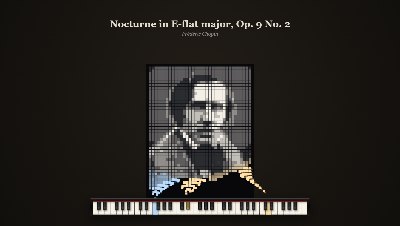
Every note you play paints the composer
Composer Portrait: each note sends a grain of light up from its key, and the last note of the clip finishes the picture. Chopin is built in; bring any picture of your own.
Whatever length the clip, the picture completes as the music does.
The video people watch to the end to see the face appear.
Your take and your sheet music. That is all.
Played it from sheet music or a tab? That file is all SheetVideo needs. No tapping beats, no keyframes, nothing to install.
Your take
A phone video, an interface take, or just the sound.
Your sheet music or tab
The PDF, MusicXML, MIDI or Guitar Pro file you played from.
Your video
It lines every bar up by listening and opens on the finished video. Change the look if you like, and export.
Piano looks
Real exports over live performances. Open one and it plays with sample music; your own take goes in with one drop.
Every note lands on time, even through your rubato.
Measured: under 5 ms median error, 43 ms at worst (under two frames), from 0.6× to 1.75× the written tempo. How we measured it
Free for Shorts. Pro for the whole thing.
Free
- Unlimited exports up to 60 seconds, at full quality
- Every look, piano and guitar
- A small moving “Made with SheetVideo.com” mark
Pro
No watermark- No watermark, in the export or the preview
- The whole take, however long
- Every clip exported in one go
Or €8.99 a month. VAT included, stop any time. Full pricing
Questions
I don’t have a score file. What now?
Use the one you learned it from: a Guitar Pro or MuseScore file, a MusicXML or MIDI download, or a PDF exported from a notation program. SheetVideo lines the score up with your playing; it does not write the notes from the sound. Below the steps on this page is a list of the usual places to find one.
Do I need a MIDI file?
You need a score of the piece: MIDI, MusicXML, Guitar Pro or a PDF. It tells SheetVideo which notes to draw; your recording decides when they fall.
Is it free?
Making and exporting is free, up to 60 seconds a video, with a small moving watermark. Pro removes the watermark, exports the whole take and exports every clip in one go.
Do my videos get uploaded?
No. The recording stays on your computer and the export is made there. It runs in a current Chrome, Edge, Safari or Firefox; there is nothing to install.
Can I use the videos commercially?
Yes, on monetised channels, in paid courses and for clients, free exports and Pro alike.
Falling notes that breathe with your rubato.
Free in your browser · nothing is uploaded · no account until you export