Every teacher knows the lesson where the piece sounds exactly as it did a week ago. Usually the student did practice, just not the way you meant: from the top, at full speed, mistakes included. Here is why that happens, what good home practice looks like, and how to give each student a clean score they can slow down, loop and play along with, starting the way you would start it in the lesson, with what our tool for it does well and what it does not.
In the browser · only the students you invite can open it
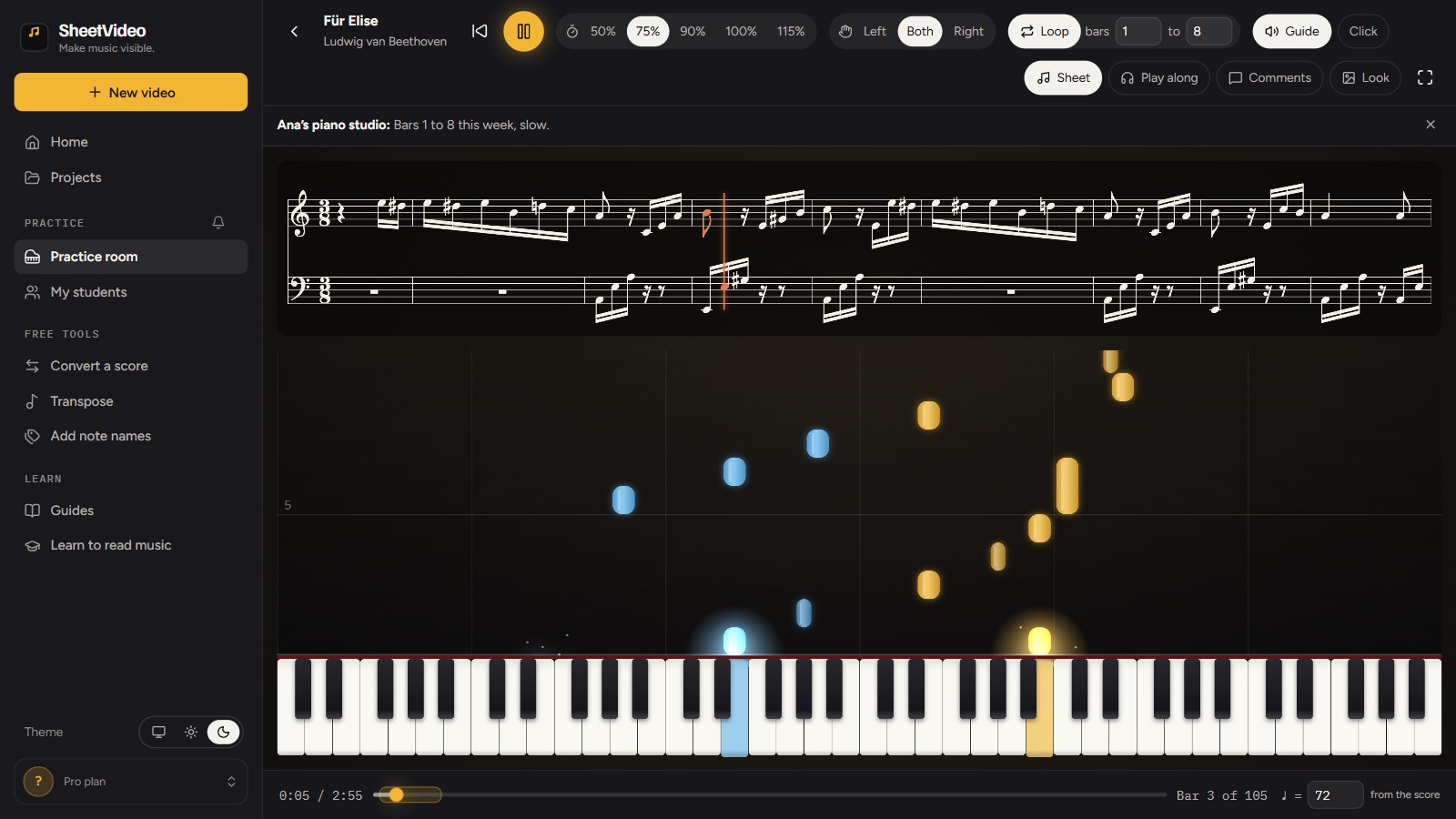
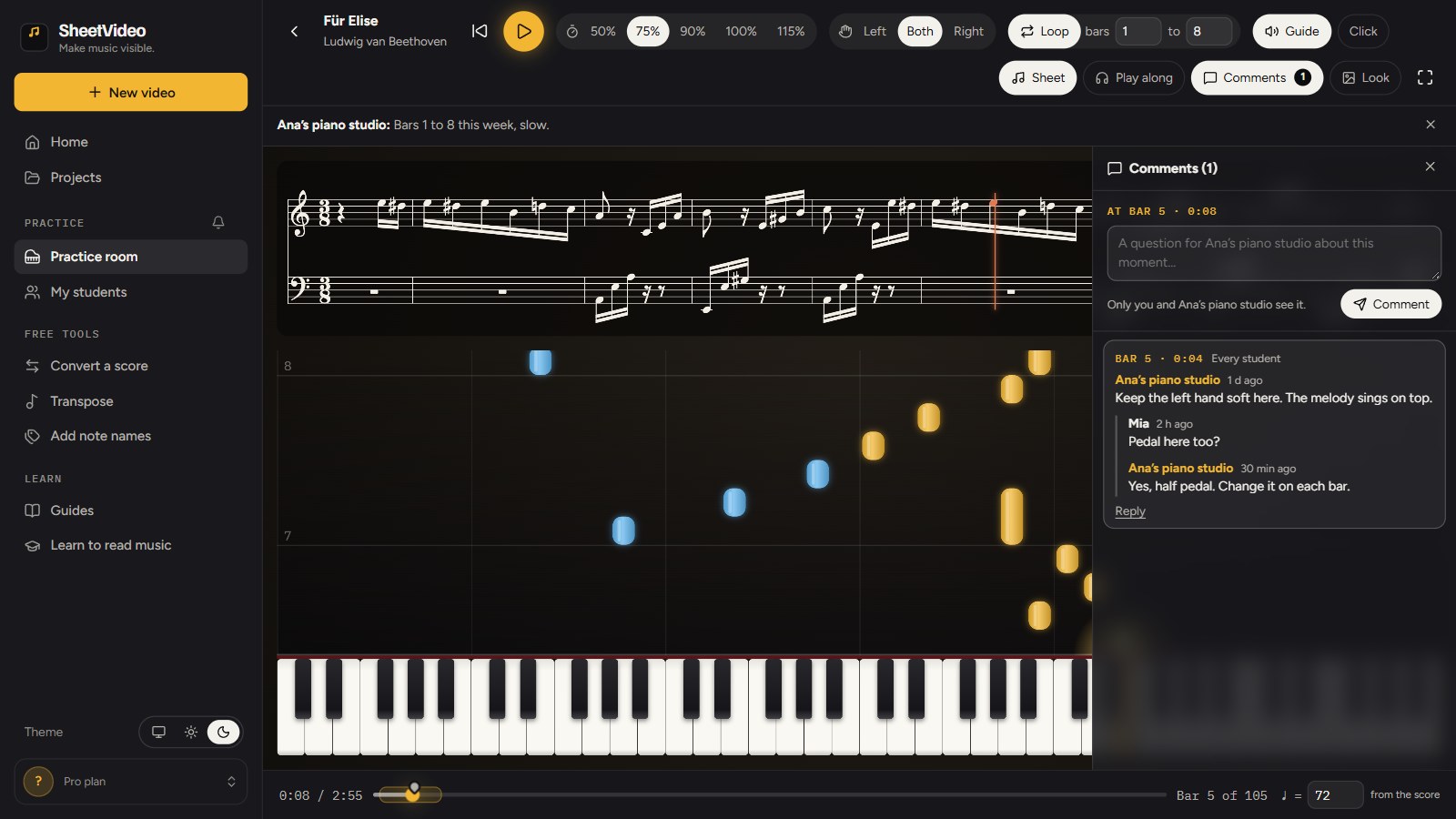
A practice as the student opens it: the teacher’s note, 75% speed, bars 1 to 8 looped.
The way it is usually done
Write the assignment in the notebook
Hope it gets practiced slowly, a few bars at a time
Questions wait until the next lesson
A silent page: it cannot play a bar, slow down or show the next key
The assignment is right. What happens at the piano between lessons is out of your hands.
With SheetVideo
A clean score, joined to falling notes and a grand piano
It starts your way: speed, loop, hands, a note
They slow it down, loop it and play along, on any device
Your comment shows on the bar that needs it
The student learns by playing with the music, and it starts where you would start it.
The problem
Why students do not practice the way you ask
When practice does not happen, it is rarely laziness alone. Talk to students and parents and the same few reasons come up, week after week.
They do not know what to do. "Practice the Beethoven" is not a plan. Which bars? How fast? Hands together or apart? Alone at the piano, a student fills the gap with the only plan they know: play it from the top.
Full speed is too hard, so it feels bad. Playing a passage at full tempo before the fingers know it means stumbling every time, and practice that feels like failure stops after ten minutes.
They practice what they can already play. Starting from the top, most of the session goes on the first page, and the hard bars get what is left.
Corrections fade. "Lift the pedal on every bar" is clear in the lesson and gone by Wednesday. A note in the notebook is pages away from the music it is about.
Questions have nowhere to go. Unsure about a fingering on Tuesday, a student either guesses and practices the guess all week, or skips the passage.
The page is silent. A printed score cannot play a passage, slow it down or show which key comes next, so a student who is unsure has nothing to check against.
Each of these is a problem of structure, not of willpower. Fix the structure and most students practice more, and better, without being told to try harder.
The method
What effective home practice looks like
Studio experience and the research on practice agree on the basics: short, focused, slow enough to be right, and repeated. For a piece the student is learning, that means:
Small chunks. Two to eight bars at a time, usually the hardest ones first: small enough to play right several times in a row.
Slow enough to be right every time. Playing a passage wrong at speed practices the mistake. Slowed down until it is clean, the hands learn the right notes, fingering and rhythm, and speed comes from repeating what is right.
Hands apart before hands together, for anything with independent hands. Most "hands together" problems are one hand that does not know its part yet.
Speed in steps, not in one jump. A ladder that works for most pieces at most levels: 50%, then 75%, then 90%, then full tempo. Move up a step when the current one is clean three times in a row.
Join the chunks. Once a passage is solid, practice it with a bar either side, so it connects to what comes before and after.
Short daily sessions beat a long one. Fifteen focused minutes on five days do more than an hour the night before the lesson.
None of this is new to a teacher. The hard part is getting a student to do it at home, alone, when the easy thing is to play from the top.
The assignment
How to write a practice assignment that gets done
An assignment that works answers four questions without the student having to think: what, how fast, how, and when it is done. Compare "practice the first page" with "bars 1 to 8, right hand alone at 75%, until you can play it three times in a row without stopping, then both hands at 75%".
Write one goal per piece per week, not five. Say what to do rather than what went wrong: "count the eighth rest aloud" helps more than "you rush bar 6". And make it checkable, so both of you know at the next lesson whether it was reached.
Even a perfect assignment in a notebook is only words, though. At the piano the student still has to set the metronome, find bar 1, remember to stop at bar 8, and resist playing on. Each of those steps is a place where practice drifts back to playing from the top.
Step by step
Setting up each student’s practice in SheetVideo
This is the problem teacher practices in SheetVideo were built for. Instead of writing the assignment down, you hand over the piece itself: a clean score joined to falling notes and a grand piano, that the student can slow down, loop and play along with. It opens set the way you would start it, with a note from you, on a computer, a tablet or a phone, in the browser. Every picture below is the real teacher page and practice room.
1Drop in the score
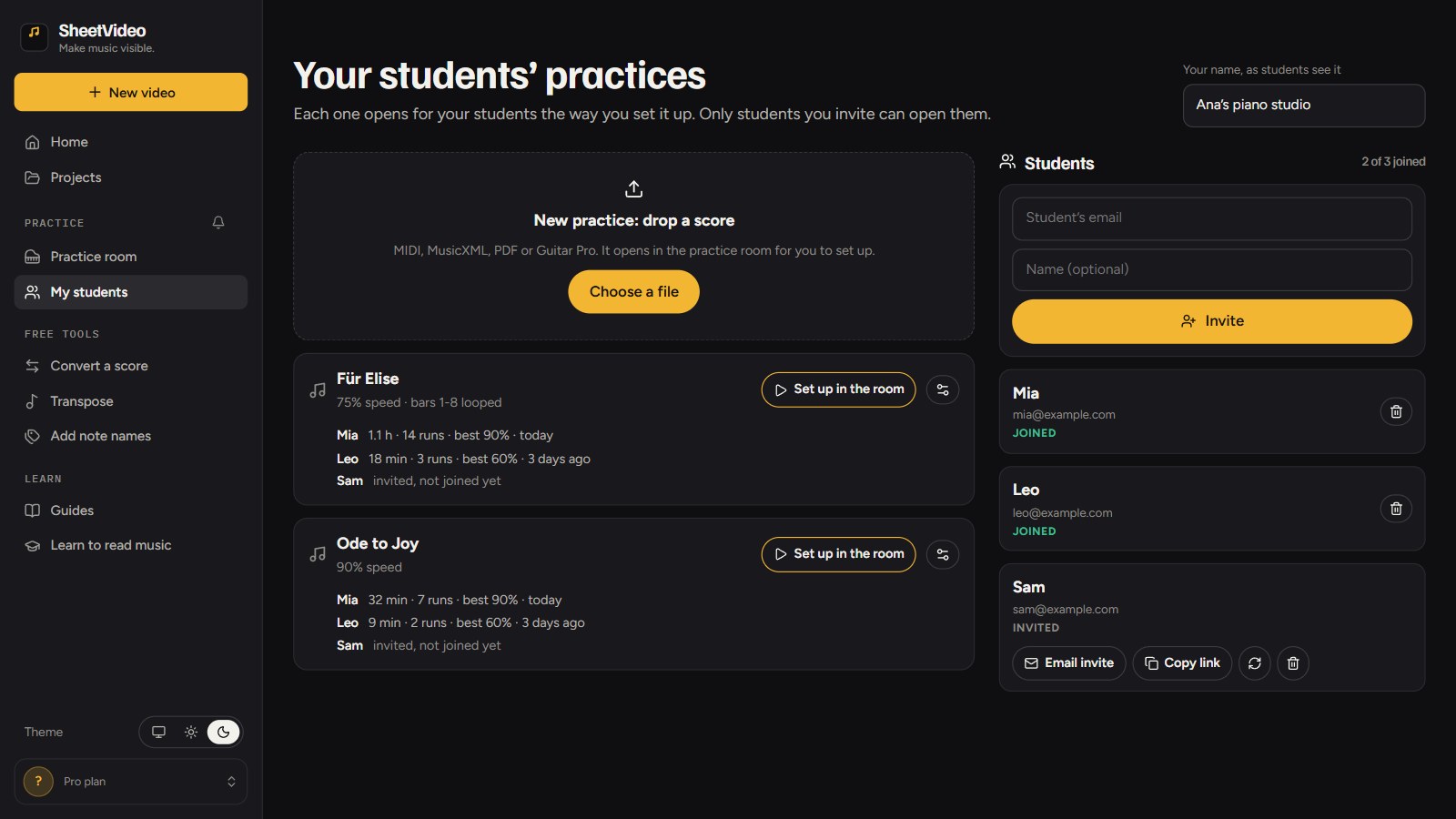
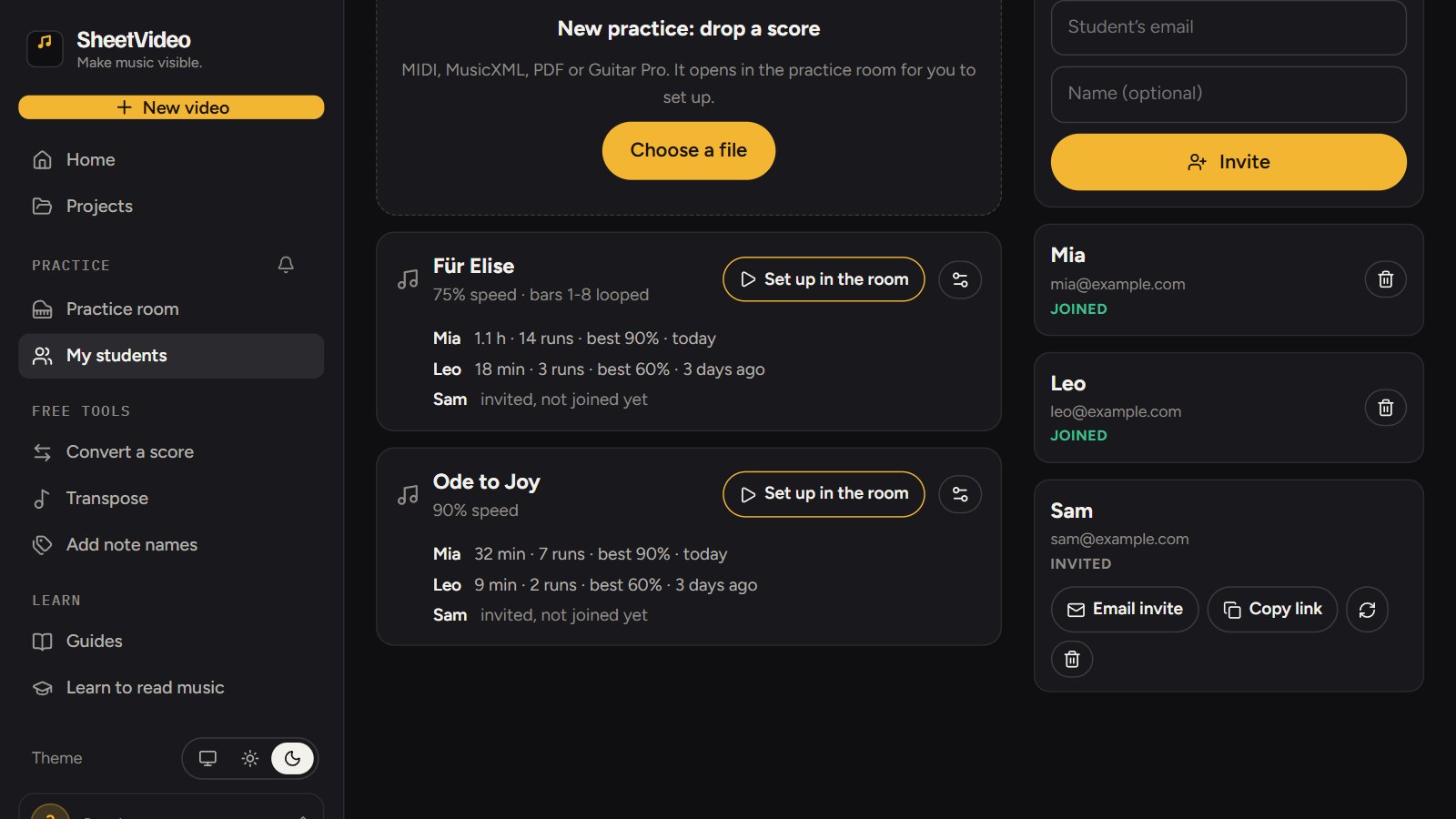
Open My students (sheetvideo.com/practice/teach) and drop the score on New practice. It reads MusicXML (.musicxml, .mxl), MIDI, Guitar Pro, and PDFs, best those exported from notation software such as MuseScore, Sibelius, Finale or Dorico. For a piece with several parts, pick the one the student plays.
My students: your practices on the left, your students on the right.
2Set it up in the room
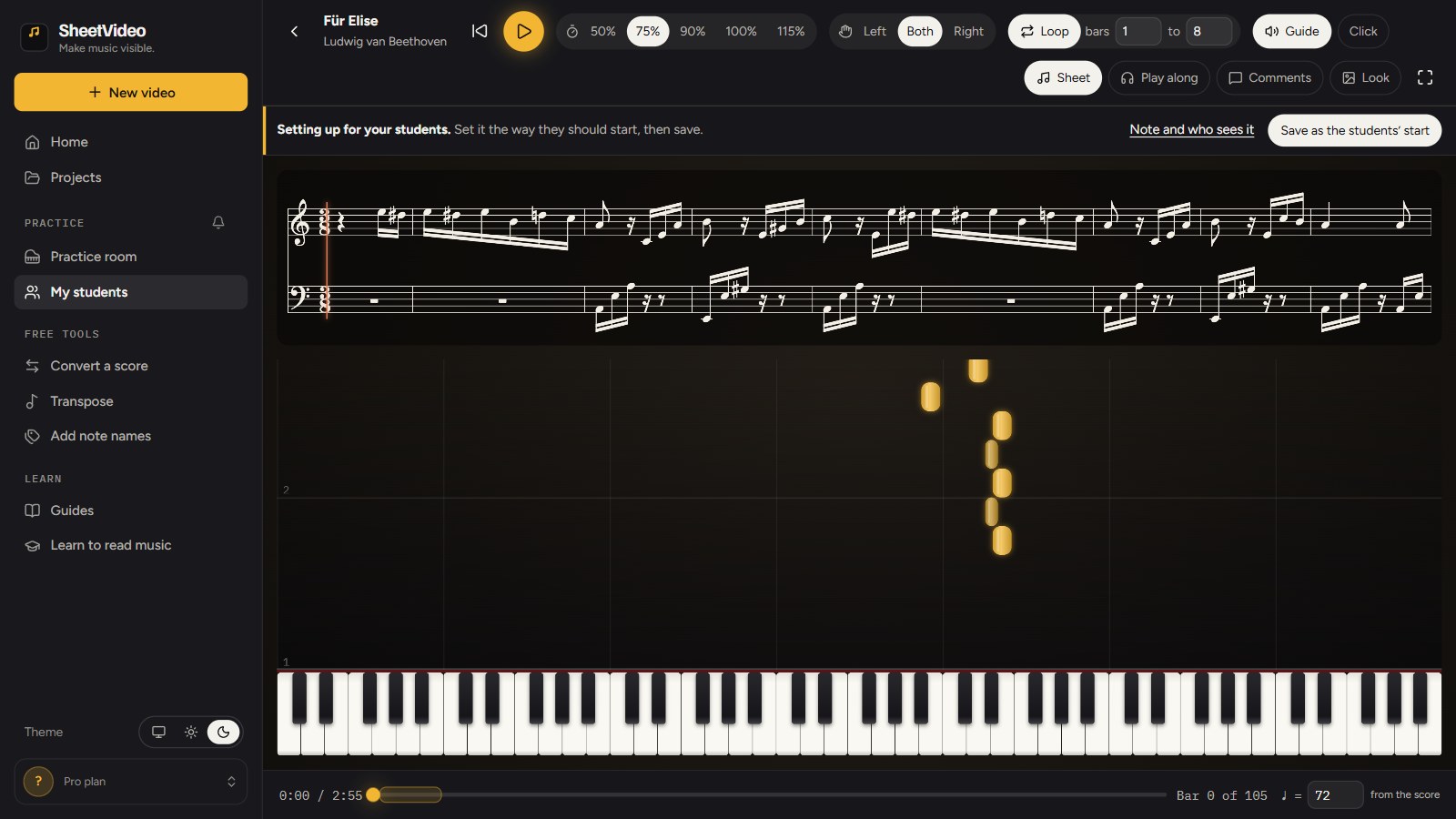
The piece opens in the practice room in setup mode. Set it the way the student should start: the speed (50%, 75%, 90%, 100% or 115%), the tempo itself if the file has none, left hand, right hand or both, and the bars to loop.
Optionally add a real performance from YouTube to practice along with. You do the syncing once, and the notes follow that recording. If it does not sync well, only you see that, and the practice opens at a steady tempo instead.
Setup mode: set it as you would in the lesson.
3Save it, write a note, choose who sees it
Press Save as the students’ start. Then write a short note ("Bars 1 to 8 this week, slow. Right hand first.") and choose who sees the practice: every student, or only the ones you tick. Two students on different steps of the same piece? Add it twice, one practice each.
4Invite your students by email
Add a student’s email on My students. Each student gets a link of their own, which you send from your own email account or copy into a message. It opens only for an account signed in with that address, so a forwarded link opens nothing for anyone else. Remove a student and they lose access at once.
5Your student opens it, set up your way
The practices you share appear in the student’s practice room under From your teacher. Each time they open one they get a clean score with a line moving through it, the notes falling onto a keyboard under the sheet and a grand piano to follow, and it starts your way: your speed, your loop, your hand, your note above the music.
They can change anything while they practice, and next time it opens your way again.
What the student sees: your note, your speed, your loop.
6Leave feedback on a bar
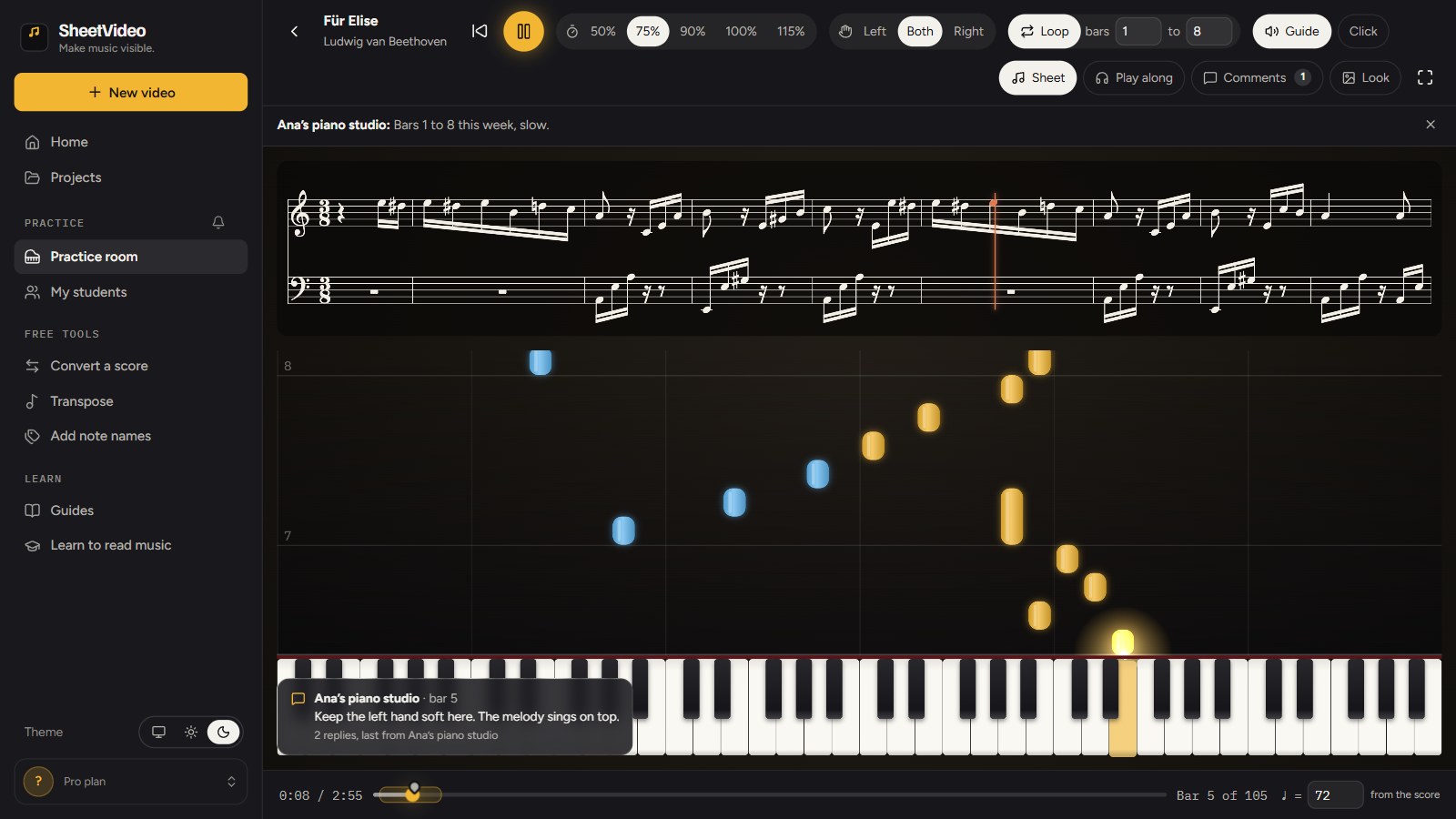
Pause on a bar and leave a comment. It is pinned to that moment on the timeline and pops up on that bar each time the student plays through it, so "keep the left hand soft here" is in front of them exactly where it applies. A comment goes to every student who has the practice, or to one of them.
The comment appears on its bar while the music plays.
7Answer questions where they come up
Students can ask on a bar too. Their question reaches you with the bar attached, and only that student and you see it. Answer underneath and the answer stays on that bar for next time. The bell in SheetVideo shows new comments, answers and shared pieces, for you and for your students.
Each thread keeps its bar: your comment, their question, your answer.
8If you want it: a line on how the week went
Under each practice on My students, every student who has it gets one line: time with the music playing, runs through, best speed, and the day they last practiced. The point of the room is the learning, not this line, but it can tell you where to start the next lesson. Best speed at the target: move up a step or widen the loop. Little time: play the piece together, slowly.
One line per student per piece: time, runs, best speed, last practiced.
Tell students about this line when you invite them, and use it to praise and to notice a student who is stuck.
An example
A week with one student, start to finish
To make it concrete, here is how a week can go with a student learning the opening of Für Elise.
9Lesson day
You play through bars 1 to 8 together: the right hand is close, the left hand is not. After the lesson you set up the practice: bars 1 to 8 looped, 75%, left hand alone, with the note "Left hand alone until it is easy, then both hands at 75%". You add a comment on bar 5: "Keep the left hand soft here, the melody sings on top."
10Day two
The student loops the left hand at 75%, with the notes falling onto the keys and the piano to follow, and asks on bar 5 whether to pedal. You answer the same evening: half pedal, change on each bar.
11Day four
The left hand is getting easy, so they switch to both hands, still at 75%. Your comment comes up each time they reach bar 5, at the moment it applies.
12The next lesson
They try 90% on their own, since the speed is one click away. In the lesson they play bars 1 to 8 at 90% with hands together, so you start there instead of rebuilding the left hand from scratch, and afterwards you move the practice to 90% and bars 1 to 16.
Benefits
What changes when practice is set up, not written down
The student learns from a clean, readable score, with the sound and the keys joined to it.
They can hear and see how a bar goes, at any speed, instead of guessing at home.
Practice starts right: slow, looped, hands apart, the way you would start it, every time the student opens it.
Slow practice actually happens, because the slowing down is done for them.
Corrections stay where they apply, on the bar, instead of in a notebook.
Questions reach you during the week, with the bar attached, while they still matter.
It works on whatever the family has: a computer, a tablet or a phone, in the browser, with nothing to install.
Limits
The downsides and limits, honestly
It is a practice tool, not a teacher, and it is worth knowing where it stops before you rely on it.
It does not listen to an acoustic piano and does not grade right or wrong notes. It counts time and runs in the room, but it cannot tell you whether the phrasing was musical.
The line on how the week went is rough. It only counts time in the room with the music playing, so practice from the paper score shows nothing, and a room left playing counts.
Students need a SheetVideo account, signed in with the email address you invited. Younger students will need a parent to set this up once.
There are no automatic emails. You send the invite from your own email account (or copy the link), and new comments show in the bell inside SheetVideo, not in an inbox.
The score is only as good as the file. MusicXML and MIDI read exactly; a PDF exported from notation software usually reads well; a scanned or photographed page is hit and miss. Look over the score before you share it.
Syncing a YouTube performance needs Chrome or Edge on a computer, and some recordings do not line up (cuts, a different edition, very free playing).
Piano comes first. Guitar and bass parts show as tab over a neck, but the falling notes and hands apart are built for keyboard.
It needs an internet connection to open a practice.
Most of these do not matter for a student working through a piece at home. But if your students mostly practice on acoustic pianos away from any screen, or you want a tool that judges playing, this is not that.
Fit
Is it right for your studio?
It fits best when your students learn from scores you can get as MusicXML, MIDI or a clean PDF, practice at home with a screen nearby (a tablet on the music stand is enough), and need help with how to practice more than with what to practice. It is especially useful for beginners and intermediates, whose practice most often drifts back to playing from the top, and for students who are shy about asking questions in the lesson.
It fits less well for advanced students working on interpretation, where the useful feedback is about sound rather than notes and tempo, and for repertoire you only have as a printed book with no digital edition.
The simplest way to find out is to set up one piece for one student for a week, and hear the difference at the next lesson.
Questions
Short and daily beats long and rare. Ten to fifteen focused minutes for young beginners, twenty to forty for intermediates, is a common starting point. Focused matters more than long: a few bars at the right speed, repeated, is better than an hour of playing through.
Slow enough to play it right three times in a row. For a new passage that is often 50% to 75% of the final tempo. Move up in steps (75%, 90%, full) rather than jumping straight to full speed.
MusicXML (.musicxml, .mxl), MIDI, Guitar Pro, and PDFs, best those exported from notation software such as MuseScore, Sibelius, Finale or Dorico. A scanned page reads only when it is straight and sharp; a MusicXML or MIDI export is the surest.
Yes, any time. Your setup is where they start each time they open the practice, and the next time it opens your way again.
Only students you invited, signed in with the email address you invited. A forwarded link opens nothing for anyone else. Remove a student and they lose access at once.
No. Each student sees their own practice and their own questions. Your comments go to every student who has the practice, or only to the one you choose.
No. It makes the time between lessons count. Technique, sound, posture and musicianship still come from you, in the lesson.
Try it with one student for a week
Drop the piece, set it up the way you would in the lesson, and invite your student by email.